
As businesses increasingly depend on cloud accounting, digital banking, online payments and remote working, protecting access to sensitive information has become an essential part of financial and operational risk management.
Two-factor authentication and two-step verification are among the most widely used methods for strengthening account security, but they are not technically identical.
The difference may appear small, yet it can influence how effectively a business protects financial records, customer information and administrative accounts against unauthorised access.
According to the UK government’s Cyber Security Breaches Survey 2025/2026, 43% of businesses identified a cybersecurity breach or attack during the previous 12 months, while only 47% reported requiring two-factor authentication.
Our analysis of authentication methods and business security practices suggests that organisations should evaluate the actual protection provided rather than relying solely on the terminology used by a software supplier.
What Is Two-Factor vs Two-Step Verification?
Two-factor authentication (2FA) requires two different categories of evidence to confirm someone’s identity, whereas two-step verification (2SV) describes a process involving two separate verification stages.
The key difference is that two separate steps do not necessarily involve two independent authentication factors.
For example, entering a password and then answering a security question involves two steps, but both rely on something the person knows.
By contrast, entering a password and approving a login using an authenticator registered to a trusted device combines knowledge with possession.
Both approaches introduce additional security checks, but the protection they provide can differ significantly.
Two-Factor vs Two-Step Verification at a Glance
| Feature | Two-Factor Authentication | Two-Step Verification |
| Meaning | Uses two different authentication factors | Uses two verification stages |
| Number of factor categories | Two distinct categories | One or more |
| Common example | Password and authenticator app | Password and security question |
| Security strength | Depends on the factors and implementation | Depends on the steps used |
| Protection against stolen passwords | Stronger than password-only access when properly implemented | Depends on the second step |
| Phishing resistance | Varies by method | Varies by method |
| Business suitability | Preferred for sensitive accounts | Depends on whether genuine MFA is provided |
| Implementation | Can involve passwords, devices, biometrics or security keys | Can involve similar technologies |
| Main limitation | Some methods remain vulnerable to phishing or account recovery attacks | Two steps may rely on the same underlying weakness |
The terminology is also not consistently applied by technology providers.
Some platforms describe a genuine two-factor authentication process as two-step verification. Consequently, a feature called 2SV may deliver the same protection as 2FA.
The business priority should be understanding how identity is verified, not simply which name appears in the account settings.
What Is Two-Factor Authentication and How Does It Work?
Two-factor authentication is a security mechanism designed to verify a user’s identity through two different types of authentication evidence.
Traditional password-only authentication relies on knowledge of a secret.
If a criminal obtains that password through phishing, malware or a previous data breach, the account may become accessible.
Two-factor authentication introduces another independent requirement.
What Are the Three Main Authentication Factors?
Authentication systems generally use three categories.
1. Something You Know — Knowledge Factor
This includes information known by the authorised user:
- Account passwords.
- Personal identification numbers.
- Security-question answers.
- Memorised access codes.
2. Something You Have — Possession Factor
This includes something the authorised user possesses or controls:
- Registered smartphones.
- Hardware security keys.
- Authenticator applications on trusted devices.
- Physical authentication tokens.
- Smart cards.
3. Something You Are — Inherence Factor
This refers to biometric characteristics, including:
- Fingerprints.
- Facial recognition.
- Iris recognition.
- Other supported biometric identifiers.
A password combined with possession of a registered security key can provide genuine two-factor authentication.
Similarly, a suitably implemented credential protected by possession of a trusted device and local biometric verification can provide multifactor protection.
However, a fingerprint on its own is not automatically two-factor authentication. The implementation must provide independent authentication factors.
How Does a Typical Two-Factor Login Work?
Consider a business accountant accessing an online financial management platform.
Step 1: The accountant enters the registered username and password.
Step 2: The system requests verification through an approved authenticator application.
Step 3: The accountant confirms the login using the registered device.
Step 4: The platform validates the authentication requirements and grants access.
This arrangement can reduce the risk associated with a compromised password.
Nevertheless, some authentication codes can be stolen through sophisticated phishing websites, while attackers may attempt to hijack authenticated sessions.
Two-factor authentication should therefore be regarded as an important security control rather than a guarantee against account compromise.
What Is Two-Step Verification and How Does It Work?
Two-step verification requires users to complete two verification stages before gaining access to an account or completing a protected action.
The steps can involve different authentication factors, although that is not a requirement of the general terminology.
A basic example involves entering an account password followed by the answer to a security question.
The process uses two separate checks but only one authentication category: knowledge.
Another service may use a password followed by a code generated by an authenticator application.
That process can qualify as both two-step verification and two-factor authentication.
This distinction is important because technology companies frequently use the terms interchangeably.
Does Two-Step Verification Always Require a Password?
No.
Some modern authentication systems use passkeys, trusted devices or other passwordless technologies.
Google, for example, describes its account protection feature as 2-Step Verification, while supporting passkey-based sign-in experiences that do not require users to enter a conventional password and then separately provide a code.
A passkey protected by suitable local user verification can provide multiple authentication factors within a simple sign-in experience.
Therefore, counting visible login screens is not a reliable way to determine authentication strength.
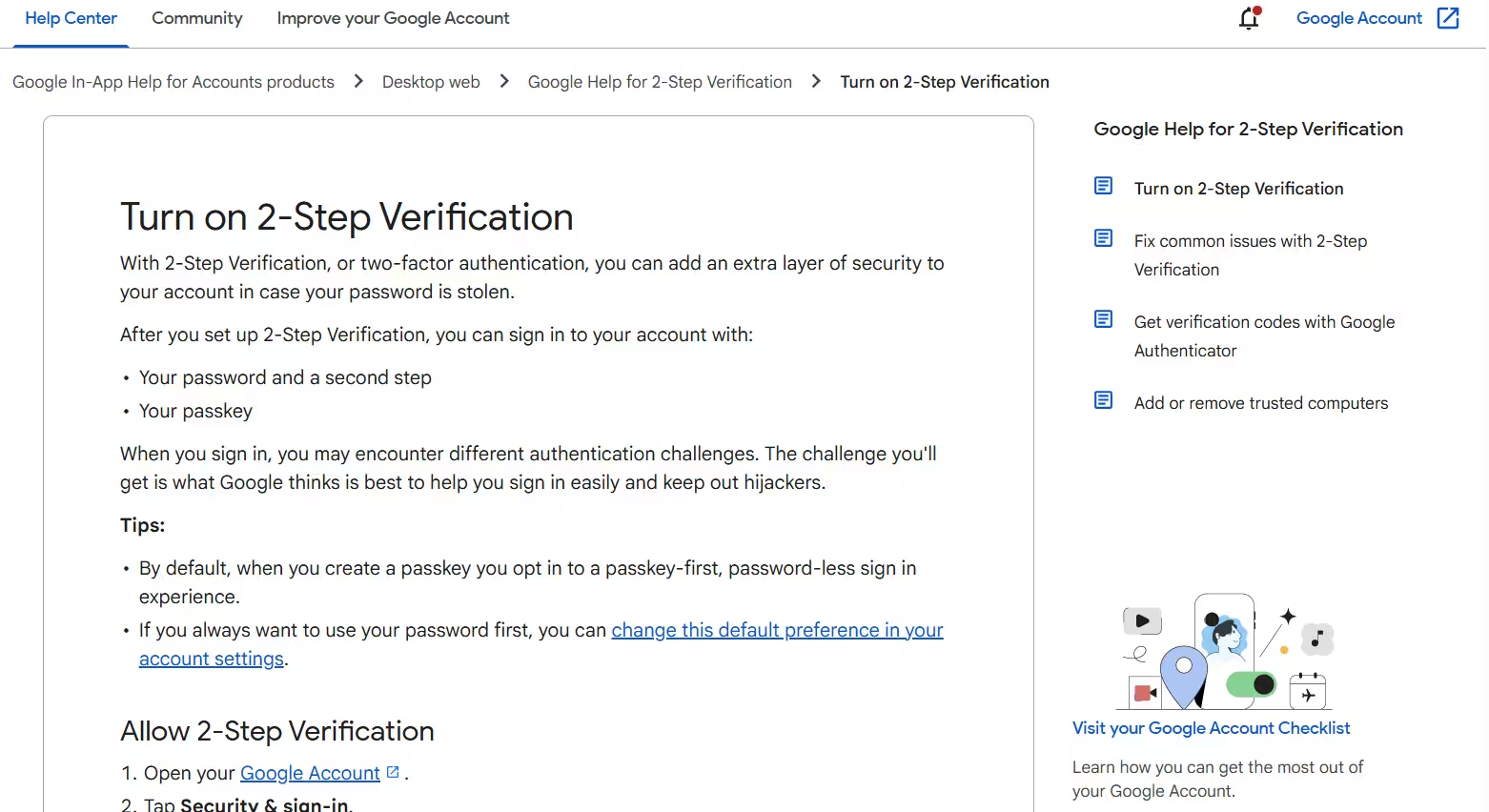
Google’s official 2-Step Verification guidance explains password-based verification and passwordless passkey sign-in.
Why Does the Difference Matter for UK Businesses?
The distinction matters because business accounts frequently contain information or permissions that could expose an organisation to financial loss.
A compromised account might allow an unauthorised person to access customer information, change payment details, manipulate invoices or interfere with operational systems.
For a business employing several people, one account compromise can also affect connected applications.
Our assessment identifies four important areas of exposure.
1. Protecting Business Banking and Financial Accounts
Online banking systems often use more than one authentication element to establish a customer’s identity.
This becomes particularly important when approving payments or changing account security settings.
A company financial controller, for example, may enter login details and then authorise a transaction through a banking application.
Strong authentication can help reduce the risk of fraudulent access.
However, businesses should also verify payment instructions independently, especially when suppliers unexpectedly request changes to bank details.
Authentication protects identity and access; it does not establish that every payment instruction is genuine.
2. Securing Payroll and Employee Information
Payroll systems can contain:
- Employee names and contact information.
- Salary details.
- Bank account information.
- National Insurance numbers.
- Tax and pension records.
An unauthorised login could expose confidential information or create opportunities for payment manipulation.
Businesses should therefore require strong authentication for payroll administrators and employees handling sensitive personnel information.
3. Protecting Connected Cloud Applications
Many organisations depend on connected systems covering email, accounting, customer relationship management, cloud storage and project management.
A single integration platform may hold permissions across several services.
When evaluating security and access controls for connected business applications, businesses should consider not only login protection but also third-party permissions, administrator access and the ability to revoke connections.
Strong authentication should accompany appropriate permission controls.
4. Reducing the Impact of Password Theft
Employees sometimes reuse passwords, select predictable credentials or accidentally disclose login information through phishing attacks.
If an account relies exclusively on a password, obtaining that password may be enough to gain access.
An independent second authentication factor makes this type of compromise more difficult.
It cannot eliminate every threat, but it substantially changes the conditions an attacker must satisfy.
What Do UK Cybersecurity Statistics Reveal About Authentication?
The Cyber Security Breaches Survey 2025/2026 provides useful insight into the cybersecurity challenges facing UK organisations.
| Business cybersecurity measure | Reported percentage |
| Businesses identifying a cyber breach or attack | 43% |
| Businesses identifying a phishing attack | 38% |
| Businesses requiring two-factor authentication | 47% |
| Micro businesses requiring two-factor authentication | 43% |
| Businesses using password policies | 74% |
| Businesses restricting administrator rights | 73% |
These figures highlight an important difference between traditional password management and stronger authentication arrangements.
While 74% of businesses reported password policies, fewer than half required two-factor authentication.
The data also shows improvement.
The proportion of businesses requiring 2FA increased from 40% in the previous survey to 47% in 2025/2026.
Among micro businesses, adoption rose from 35% to 43%.
Although this suggests growing awareness, a substantial proportion of businesses were still operating without a reported 2FA requirement.
Our interpretation: Businesses should regard authentication as a routine financial and operational control, particularly where employees access cloud services containing commercially sensitive information.
The percentages describe different survey measures and should not be interpreted as proof that 2FA directly prevented a specific proportion of reported attacks.
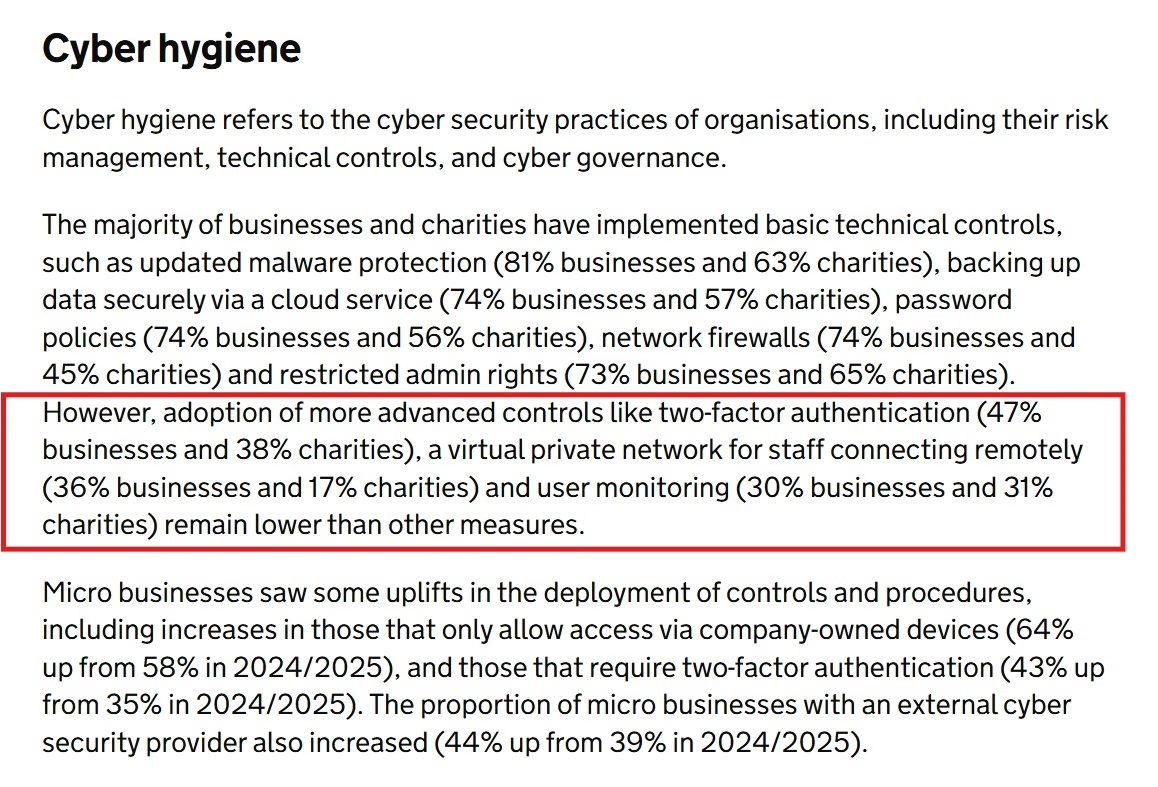
UK Cyber Security Breaches Survey 2025/2026 showing the adoption of two-factor authentication and other cybersecurity controls among businesses.
Which Authentication Methods Provide the Strongest Business Protection?
Not every authentication technology offers the same level of resistance to phishing, credential theft or account takeover.
The National Cyber Security Centre recommends prioritising stronger methods, particularly FIDO2-based credentials, where appropriate.
Our comparison considers security design, implementation complexity and suitability for business operations.
| Authentication method | Main advantage | Important limitation | Our indicative business suitability |
| FIDO2 passkeys or security keys with appropriate user verification | Phishing-resistant authentication | Requires supported devices and recovery planning | 95% |
| Challenge-based authenticator app | Strong device-based authentication | Depends on challenge design and device security | 85% |
| Authenticator app generating codes | Avoids reliance on SMS delivery | Codes can still be phished | 75% |
| SMS verification codes | Widely accessible | Vulnerable to phishing and SIM-related attacks | 45% |
| Password and security question | Simple additional check | Both rely on knowledge factors | 15% |
These percentages are our indicative editorial suitability scores for protecting sensitive business accounts.
They are not measured attack-prevention rates, security guarantees or results from controlled product testing. Actual suitability depends on the provider, configuration, recovery controls and business environment.
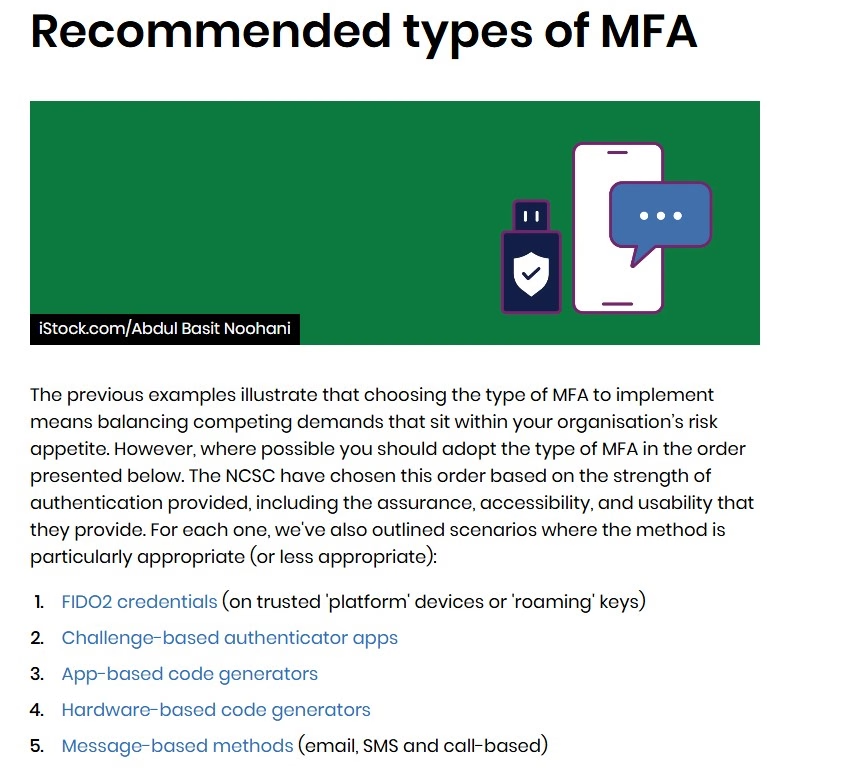
The National Cyber Security Centre’s recommended MFA methods, showing FIDO2 credentials, challenge-based authentication and code-based alternatives.
Why Are Hardware Security Keys and Passkeys Often Preferred?
FIDO2 authentication uses public-key cryptography to verify possession of an appropriate credential.
Unlike ordinary one-time codes, authentication is linked cryptographically to the legitimate service.
This helps protect users against fraudulent websites attempting to capture and replay login information.
For particularly sensitive business accounts, FIDO2 credentials with appropriate local verification can deliver strong phishing-resistant multifactor authentication.
Potential applications include administrator accounts, financial systems and important corporate identity platforms.
Businesses must still manage device security, credential recovery and access permissions.
Are Authenticator Applications Safer Than SMS?
Authenticator applications generating time-based codes are generally preferable to SMS where stronger methods are unavailable.
They do not rely on the mobile network to deliver each code.
However, a criminal operating a convincing phishing website may still trick an employee into entering a current authenticator code.
The attacker could then attempt to use it before expiry.
Challenge-based applications that verify the correct service or transaction can offer stronger protection, depending on their implementation.
Why Should Businesses Avoid Relying on SMS Alone?
SMS-based verification can strengthen an account that would otherwise rely exclusively on a password.
Nevertheless, it introduces vulnerabilities associated with telephone numbers and mobile networks.
Potential threats include SIM-swapping, phishing, stolen devices and fraudulent attempts to transfer a telephone number.
SMS authentication may remain useful where stronger technologies cannot be supported, but it is generally less suitable for protecting high-risk administrative and financial accounts.
Can Two-Factor Authentication Be Hacked?
Yes. Two-factor authentication reduces account security risks, but it does not make accounts impossible to compromise.
Businesses should understand the limitations of their selected method.
Phishing Attacks
Fraudulent websites can imitate legitimate login pages and request usernames, passwords and verification codes.
Traditional one-time codes may be captured and used by an attacker.
Phishing-resistant authentication methods are designed to address this weakness more effectively.
MFA Fatigue Attacks
Some attackers repeatedly trigger authentication notifications in the hope that a user approves one accidentally.
Employees should be trained to reject unexpected login requests and report repeated notifications.
Stolen Login Sessions
After successful authentication, services often use session cookies or tokens to maintain access.
Malware or other compromises may allow attackers to steal these credentials.
This means an attacker may sometimes bypass the need to repeat the original authentication process.
Weak Account Recovery
A business could deploy strong authentication yet undermine its effectiveness through insecure account recovery.
For example, an attacker might exploit a weak helpdesk identity-checking process to register a new authentication device.
Recovery arrangements should therefore receive security controls proportionate to those protecting ordinary sign-ins.
How Can Businesses Protect Their Accounts Beyond Authentication?
Authentication is only one component of organisational cybersecurity.
Businesses should also examine the overall security of the technology they operate.
Regularly applying software updates and security patches can address vulnerabilities that might otherwise expose devices and applications to attack.
An organisation should also manage:
- Employee access rights.
- Administrator privileges.
- Software and device updates.
- Suspicious login alerts.
- Third-party integrations.
- Backup and recovery arrangements.
- Staff cybersecurity awareness.
- Employee departure procedures.
These controls complement authentication rather than replacing it.
For instance, an account protected by a security key can still be vulnerable if the employee’s computer is compromised or an unnecessarily privileged connected application is abused.
Is Two-Factor Authentication Required for UK Business Compliance?
The answer depends on the organisation, the systems it operates and the standards or regulations that apply.
Although strong authentication is increasingly expected, there is no single universal rule stating that every UK business account must use one particular form of 2FA.
Three areas are particularly relevant.
Cyber Essentials
Cyber Essentials is a UK government-backed cybersecurity certification scheme.
Its technical requirements include multifactor authentication for cloud services within the applicable scope.
The current Cyber Essentials Requirements for IT Infrastructure version 3.3, effective from 27 April 2026, requires authentication to cloud services to use MFA.
Businesses pursuing certification must assess their systems against the scheme’s applicable requirements.
This can be particularly relevant to organisations providing services to customers that require Cyber Essentials certification.
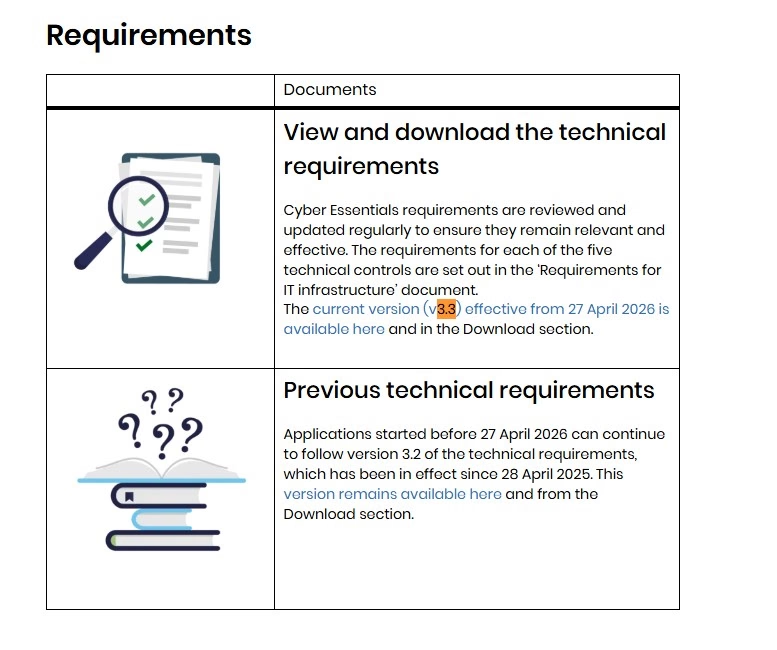
Cyber Essentials Requirements for IT Infrastructure version 3.3, showing the multifactor authentication requirement for cloud services.
UK GDPR
The UK GDPR requires organisations to implement appropriate technical and organisational measures to protect personal data.
The Information Commissioner’s Office recommends implementing two-factor or multifactor authentication wherever possible, particularly when accounts provide access to sensitive personal information.
However, UK GDPR does not impose one identical authentication method on every organisation.
Businesses should assess the sensitivity of their data, foreseeable threats and proportionality of their security measures.
Financial Services and Strong Customer Authentication
Financial services operate under additional authentication requirements.
The Financial Conduct Authority’s Strong Customer Authentication framework applies to relevant payment service providers and authentication activities, subject to applicable exemptions.
Strong Customer Authentication typically involves two or more independent elements drawn from knowledge, possession and inherence.
For online banking and certain remote electronic payments, additional requirements may also include linking authentication to the transaction amount and intended recipient.
These rules concern relevant regulated payment services. They should not be presented as a universal legal requirement for every business operating outside financial services.
How Should a Small Business Introduce Strong Authentication?
Small businesses may not have a dedicated cybersecurity department, but they can still introduce effective controls through a structured process.
Step 1: Identify Important Business Accounts
Begin by identifying services that could create serious consequences if compromised.
These commonly include business email, banking, payroll, accounting, cloud storage, website administration and customer databases.
Step 2: Prioritise Sensitive Accounts
Financial accounts and privileged administrators should receive particular attention.
Where supported, businesses should select phishing-resistant authentication for employees with significant authority or access to sensitive information.
Step 3: Enable Authentication for All Relevant Employees
Security should not depend entirely on individual employee preferences.
Administrators should establish clear access requirements and verify that employees have completed enrolment.
Step 4: Establish Safe Recovery Procedures
Employees may lose phones, replace devices or become temporarily unable to access their normal authentication method.
Businesses should prepare recovery arrangements before a problem occurs.
Backup credentials should be protected, and requests to reset authentication should require appropriate identity checks.
Step 5: Review Third-Party Permissions
Connected services can introduce additional routes into an organisation’s systems.
Businesses reviewing software integrations and third-party account permissions should identify which services can access business information and whether those permissions remain necessary.
Step 6: Train Employees
Staff should understand that:
- Unexpected authentication requests should be rejected.
- Verification codes must not be shared with callers or email senders.
- Security keys and authentication devices should be protected.
- Suspicious account activity should be reported promptly.
- A legitimate login page should be accessed directly rather than through an unexpected message.
Step 7: Monitor Adoption and Effectiveness
After implementation, business owners should measure whether authentication controls are being used consistently.
A simple measure is:
Authentication adoption rate = (Accounts protected by the required authentication method ÷ Total relevant accounts) × 100
For example, if 45 of 50 relevant employee accounts have completed authentication enrolment, the adoption rate is 90%.
This is a measure of coverage, not a claim that the business is 90% secure.
Our view is that organisations should work towards 100% enforcement across the accounts covered by their authentication policy, rather than accepting partial deployment indefinitely.
What Are the Financial Consequences of Weak Authentication?
Weak account protection can create both direct and indirect business costs.
A successful compromise may result in unauthorised payments, business email fraud, operational disruption, incident investigation costs and additional customer support requirements.
The consequences depend on the nature of the attack and the systems affected.
Consider a hypothetical company that receives an apparently legitimate email requesting a supplier bank-account change.
If an attacker has compromised the supplier’s or company’s email account, the instruction may appear credible.
Strong authentication can reduce opportunities for account compromise, but the company still needs an independent procedure for validating payment-detail changes.
A sensible financial-control framework should therefore combine:
Strong authentication + limited access permissions + independent payment verification + transaction monitoring.
For larger organisations, separation of duties and dual approval for significant financial transactions may provide another important control.
These measures should be selected according to business size, transaction risk and operational requirements.
What Should Businesses Consider Before Choosing an Authentication Provider?
Choosing authentication technology should involve more than checking whether a supplier advertises 2FA.
Our assessment suggests examining the following questions:
- Does the platform support genuine multifactor authentication?
- Are phishing-resistant FIDO2 methods available?
- Can administrators enforce authentication for all relevant users?
- Are important accounts prevented from using weaker fallback methods?
- Can suspicious sessions and authentication events be monitored?
- Are emergency access and recovery procedures appropriately protected?
- Can access be revoked immediately when someone leaves?
- Does the service support secure single sign-on or central identity management?
- Are recovery methods suitable for employees with accessibility requirements?
- Can the organisation maintain authentication without creating excessive operational disruption?
Businesses should also investigate any legacy sign-in methods that might bypass stronger protections.
An organisation can have modern MFA enabled while still exposing accounts through older authentication protocols or excluded administrator accounts.
For this reason, the strength of the overall configuration matters as much as the individual authentication product.
Are Passkeys Replacing Traditional Two-Factor Authentication?
Passkeys are becoming an important alternative to conventional password-based authentication.
They allow users to authenticate through cryptographic credentials rather than relying on a password that must be remembered and entered into websites.
In many implementations, a passkey is protected by a trusted device and local verification, such as a device PIN or biometric authentication.
This can provide strong multifactor protection through a relatively simple user experience.
Unlike ordinary passwords and one-time codes, properly implemented FIDO2 passkeys are designed to resist phishing attacks based on fraudulent website addresses.
For businesses, potential advantages include fewer password-related support requests and stronger protection against credential phishing.
However, security depends on implementation.
Businesses must consider whether credentials are device-bound or synchronised, how local user verification is enforced, which devices can be trusted and how lost credentials are recovered.
Passkeys are not automatically the strongest possible configuration in every environment.
Nevertheless, we expect passwordless authentication to become increasingly important in business cybersecurity planning.
Which Is Better for Businesses: Two-Factor or Two-Step Verification?
From a business security perspective, genuine multifactor authentication should generally be preferred over verification arrangements that rely on multiple knowledge-based checks.
However, it would be misleading to suggest that every product labelled two-step verification is weaker than every product labelled two-factor authentication.
The actual authentication mechanism determines its security.
A service using the term two-step verification may support highly secure passkeys or hardware security keys.
Meanwhile, another service advertising two-factor authentication may rely entirely on phishable SMS codes.
Our position is that businesses should prioritise the following:
First: Use phishing-resistant authentication for privileged and high-risk access wherever practical.
Second: Enforce effective MFA across business accounts rather than leaving enrolment optional.
Third: Protect recovery procedures, employee devices and third-party access.
Fourth: Review authentication controls as technologies and business operations change.
Ultimately, the most useful question is not simply whether a system uses two steps.
It is whether the authentication process provides independent, sufficiently strong evidence that the person requesting access is genuinely authorised.
Final Thoughts
Two-factor authentication and two-step verification share the same broad objective: providing stronger identity checks than a conventional password-only login.
Their technical difference becomes important when businesses evaluate whether a login process uses two genuinely independent authentication factors.
Our analysis suggests that business owners should pay particular attention to sensitive financial systems, administrator accounts, cloud applications and authentication recovery arrangements.
The UK government’s 2025/2026 cybersecurity findings also demonstrate that the adoption of two-factor authentication remains an area where many organisations could strengthen their practices.
Rather than selecting technology solely because it advertises an additional verification step, businesses should assess the actual authentication factors, resistance to phishing, recovery arrangements and wider security configuration.
Strong authentication is not a complete cybersecurity strategy, but it can form one of its most important foundations.
Frequently Asked Questions
Is two-step verification the same as two-factor authentication?
Not necessarily. Two-step verification describes two verification stages, while two-factor authentication requires two different authentication factors. The terms are often used interchangeably.
Can businesses use both 2FA and 2SV?
Yes. A login process can qualify as both when it uses two steps involving two different categories of authentication evidence.
Is an authenticator app better than a text message?
An authenticator app generally avoids vulnerabilities associated with SMS delivery, although ordinary authentication codes can still be phished. FIDO2 methods offer stronger phishing resistance.
Does a fingerprint count as two-factor authentication?
A fingerprint alone is one biometric factor. It may contribute to multifactor authentication when combined with an independent factor, such as possession of a trusted cryptographic credential.
Can a company operate without two-factor authentication?
Some businesses may operate without MFA, but doing so can create avoidable security exposure. Relevant standards, customer contracts or regulatory obligations may also require stronger authentication.
What happens if an employee loses their authentication device?
The organisation should use a previously established recovery process that securely verifies identity before allowing authentication methods to be replaced or restored.
Does two-factor authentication prevent all financial fraud?
No. It helps reduce unauthorised account access, but businesses still need controls against payment scams, social engineering, compromised devices and fraudulent transaction instructions.

More in Business Tools & Software

Top 10 Print on Demand Companies in the UK
The UK print-on-demand industry is thriving, offering creators and entrepreneurs an efficient way to launch product lines without holding inventory. Choosing the right partner is essential for success, as providers vary in pricing, product selection, and customer service. This list ranks the top 10 UK print-on-demand companies, with a clear focus on the features that […]

Best Sole Trader Accounting Software UK: 7 Options Compared for 2026
Choosing the best sole trader accounting software is not simply a matter of finding the platform with the longest feature list. A sole trader earning £800 a year from occasional freelance work has very different accounting needs from a self-employed builder dealing with CIS deductions, or a consultant whose qualifying income has pushed them into […]